UX vs UI Design: What’s the Difference?
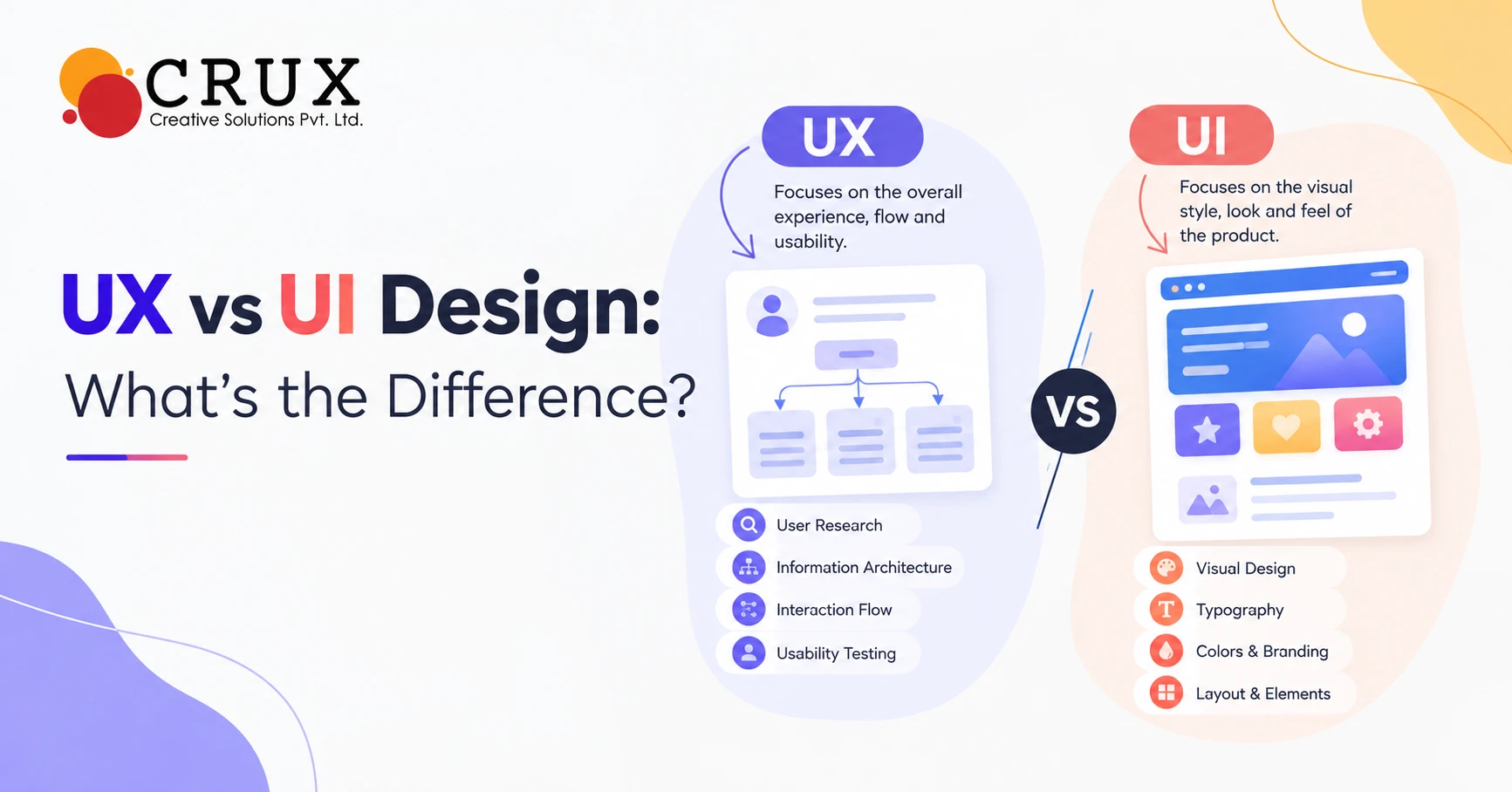
When people discuss website design, UX and UI are often used as if they mean the same thing. They are closely connected, but they solve different problems in the digital experience. UX focuses on how a user interacts with a website, product, or application and whether that journey feels simple and logical. UI focuses on the visual and interactive elements that users see and use while navigating that experience.
Understanding the difference between UX and UI design helps businesses make better decisions when planning a website or digital product. A website may look attractive but still frustrate users if its navigation is confusing or its key actions are difficult to find. Similarly, a website can have excellent usability but fail to create a strong impression if its visual design feels outdated or inconsistent. This is why effective digital projects usually treat UX and UI as connected but distinct disciplines.
What Is UX Design?
UX stands for User Experience, and UX design focuses on the complete experience a person has while using a digital product. It considers how easily users can find information, complete tasks, understand content, and move from one section to another. UX designers study user needs, behaviours, expectations, and potential pain points before shaping the structure of a website or application. The goal is to create an experience that feels clear, useful, efficient, and logical.
UX design involves much more than deciding where buttons should appear on a page. It can include user research, information architecture, customer journey mapping, wireframing, usability testing, and interaction planning. A UX designer may examine how visitors move from a homepage to a product page and eventually complete an enquiry or purchase. Every stage of that journey can influence whether a user continues interacting with the website or leaves.
What Is UI Design?
UI stands for User Interface, and UI design focuses on the visual and interactive elements through which users interact with a digital product. It includes colours, typography, buttons, icons, images, spacing, menus, forms, cards, animations, and other interface components. UI designers use these elements to create a consistent visual language across different pages and screens. Their work helps communicate information clearly while also establishing the visual identity of the digital product.
A strong UI should support the function of the website rather than simply make it attractive. For example, buttons should look clickable, headings should establish a clear information hierarchy, and colour choices should make important actions easy to identify. Consistency also matters because users should not have to relearn interface patterns on every page. When visual design and interaction work together, the interface becomes easier to understand and use.
UX vs UI Design: Key Differences
The simplest way to understand UX vs UI design is to think about the difference between experience and interface. UX is concerned with how the entire journey works, while UI is concerned with how the individual screens and interactive elements look and behave. UX might determine that a checkout process needs fewer steps, whereas UI determines how the checkout fields, buttons, labels, and error messages are presented. Both contribute to the final experience, but they approach the problem from different perspectives.
UX also tends to focus on research, structure, functionality, and usability, while UI places greater emphasis on visual communication and interaction details. A UX designer may create a wireframe that establishes the location of important content without defining its final visual style. A UI designer can then develop that structure into a polished interface with appropriate typography, colours, spacing, imagery, and components. The two disciplines often overlap, particularly in smaller teams where one designer may handle both responsibilities.
| UX Design | UI Design |
| Focuses on the overall user experience | Focuses on the interface and visual experience |
| Studies user needs and behaviour | Establishes visual hierarchy and style |
| Plans information architecture | Designs interface components |
| Uses wireframes and user flows | Uses visual designs and design systems |
| Measures usability and task completion | Focuses on consistency and visual clarity |
| Identifies friction in user journeys | Improves interaction and visual feedback |
Why UX Design Matters for Websites?
A website is often one of the first places where customers interact with a business, making usability an important part of its effectiveness. Visitors should be able to understand what the business offers, locate relevant information, and identify the next step without unnecessary effort. UX design helps organise content and functionality around real user needs rather than internal business structures. This can make the website easier to navigate across different devices and user journeys.
Good UX can also reduce friction during important actions such as submitting an enquiry, booking a service, downloading a resource, or making a purchase. Designers can identify confusing navigation paths, unnecessary fields, unclear calls to action, and other obstacles through research and testing. These improvements can create a smoother journey for visitors while helping businesses achieve their website objectives. UX therefore connects design decisions with practical user and business requirements.
Why Does UI Design Matters for Websites?
The interface creates much of the visual impression users form when they visit a website. Typography, colour, imagery, layout, icons, buttons, and spacing all influence how information is perceived and understood. A carefully designed interface can make complex information easier to scan and help important actions stand out. It also gives businesses an opportunity to express their brand consistently across digital touchpoints.
UI design is particularly important when a business wants its website to communicate professionalism and credibility. Inconsistent fonts, crowded layouts, weak contrast, outdated graphics, or poorly designed forms can make an otherwise useful website feel difficult to trust. A consistent design system can help maintain the same visual standards across pages and devices. For businesses working with a creative design agency, this visual consistency can also extend across broader digital and brand communication.
How UX and UI Work Together?
UX and UI are not competing approaches, because effective websites need both. UX establishes the structure and journey, while UI turns that structure into a clear and engaging interface. Imagine a restaurant website where UX determines that visitors should be able to view the menu and make a reservation within a few simple steps. UI then determines how the menu categories, reservation button, forms, typography, and supporting visuals appear on the screen.
The process usually works best when UX and UI decisions are developed together rather than treated as completely separate stages. User research can inform the structure, while visual design can reveal opportunities to improve navigation or interaction. Testing can then show whether users understand both the layout and the interface elements. This continuous relationship helps create digital experiences that are functional as well as visually coherent.
UX and UI in Website Development
UX and UI decisions have a direct impact on website development because designers and developers need a clear understanding of how pages should function. UX documentation can define user flows, page structures, content priorities, and interaction requirements. UI documentation can provide specifications for colours, typography, spacing, responsive behaviour, components, and interface states. Together, these details give developers a clearer framework for translating design concepts into a working website.
The relationship becomes even more important for responsive websites that need to work across desktops, tablets, and smartphones. A layout that works well on a large screen may require different navigation or content arrangements on a smaller display. Designers and developers need to consider touch interactions, screen sizes, loading behaviour, accessibility, and content hierarchy. Businesses investing in website development company in Gurgaon can benefit from treating UX, UI, and development as connected parts of the same project rather than isolated tasks.
The UX Design Process
A typical UX process begins by understanding users and the problems the website needs to solve. Research may involve analysing existing website data, interviewing users, studying competitors, reviewing customer feedback, and identifying common tasks. Designers then organise findings into user flows, information architecture, and wireframes that establish the basic structure of the experience. Testing these early concepts can reveal usability issues before substantial visual or development work begins.
After the structure is validated, designers can refine the experience through prototypes and usability testing. A prototype allows users or stakeholders to interact with proposed flows before the final website is built. Feedback can reveal whether navigation labels make sense, whether users can locate important information, or whether certain steps create unnecessary friction. This iterative process helps reduce the risk of building a website around assumptions that have not been tested.
The UI Design Process
UI design generally begins after the fundamental experience and structure have been established, although the two processes can overlap. Designers develop visual concepts that align with the brand while maintaining accessibility, readability, hierarchy, and consistency. They create interface components such as buttons, menus, forms, cards, tabs, alerts, and navigation elements. These components can then be organised into a design system that supports consistency throughout the website.
UI designers also consider how the interface responds to user actions. A button may need different states for default, hover, focus, active, disabled, and loading conditions. Forms may require visual treatment for successful submissions, validation errors, or incomplete fields. These details may seem small individually, but together they determine how understandable and responsive the interface feels.
UX vs UI: Which One Should Businesses Prioritise?
Businesses do not necessarily need to choose between UX and UI because both solve different aspects of the same digital challenge. Prioritising only visual design can result in an attractive website that does not support user tasks effectively. Focusing only on usability without considering visual communication can produce a functional interface that does not adequately represent the brand. The appropriate balance depends on the website's purpose, audience, complexity, and business objectives.
For a new website, it can be useful to establish the user journey and content structure before finalising the visual interface. This gives the design team a functional foundation on which to build the visual system. Existing websites may require a different approach if user data reveals specific usability problems or if the visual identity needs updating. In either case, UX and UI should support the same overall website goals.
Common UX and UI Mistakes
One common mistake is designing a website based entirely on internal business preferences rather than user needs. Companies may organise navigation around their departments or services without considering how customers naturally search for information. Another problem is adding too many visual elements that compete for attention and make important actions harder to identify. These issues can affect both usability and visual clarity.
Another frequent mistake is treating mobile design as an afterthought. Users may encounter tiny buttons, crowded menus, difficult forms, or poorly scaled images when a desktop layout is simply reduced for smaller screens. Accessibility can also be overlooked when designers use weak colour contrast, unclear focus states, or typography that is difficult to read. Regular usability reviews across different devices can help identify these problems before they affect a large number of visitors.
Choosing the Right Design Partner
Businesses often work with specialist teams when they need research, UX planning, visual design, development, or a combination of these services. When evaluating a UI/UX Design Agency in Gurgaon, businesses can examine its portfolio, design process, technical capabilities, communication approach, and experience with similar projects. It is also useful to ask how the team conducts user research, validates design decisions, handles responsive layouts, and works with developers. A clear process can make collaboration easier from the initial concept through launch.
The right design partner should also understand that a website is more than a collection of attractive pages. The team should be able to connect user needs with business objectives while maintaining brand consistency and technical practicality. Asking for examples of wireframes, prototypes, design systems, usability testing, and completed projects can provide a clearer picture of how the agency approaches design. This allows businesses to evaluate the process rather than judging a provider only by visual samples.
UX vs UI Design: The Future of Digital Experiences
Digital experiences are becoming more complex as websites incorporate personalisation, artificial intelligence, interactive tools, voice interfaces, and other technologies. These developments create new UX questions around trust, transparency, accessibility, and user control. UI design must also evolve to communicate dynamic information without overwhelming users. Designers therefore need to consider both traditional interface principles and emerging interaction patterns.
At the same time, fundamental principles remain important. Users still need clear navigation, readable content, understandable interactions, responsive layouts, and accessible interfaces. Strong UX helps ensure that technology serves a meaningful purpose, while strong UI helps users understand and interact with that technology. Businesses that combine both disciplines can create websites that are easier to use, visually consistent, and aligned with their digital goals.
Conclusion
UX and UI design are closely connected but address different parts of website design. UX focuses on the structure, usability, journey, and overall experience, while UI focuses on the visual interface and interactive elements users engage with. Neither discipline replaces the other, and successful websites generally require both to work together throughout the design and development process.
For businesses planning a new website or improving an existing one, understanding this distinction can make conversations with designers and developers more productive. A well-planned UX creates a logical foundation, while a thoughtful UI turns that foundation into a clear and engaging interface. When both are supported by effective development, research, testing, and ongoing improvement, a website can better serve its users and business objectives.

Princy Cycil
Meet Princy Cycil, Senior content writer of Crux, with 6 years of experience. She has written for tech, education, healthcare, finance, e-commerce, travel, FMCG, and lifestyle brands. A B.Com graduate, she started her career with accounting but realized she loves words more than numbers. She creates blogs, social media posts, and web content that connect and engage. When she’s not writing, she’s reading books, binge-watching Netflix, or sipping coffee.
Share: